
Business Partners
Many people misunderstand how Customers and Vendors work in S/4HANA. They still exist exactly as they did in ECC 6.0, but they are hidden behind the Business Partner (BP) model.
Even though BP is the main entity you see, the Sales (SD) and Materials Management (MM) modules still use the old Customer and Vendor Masters. They don’t recognize BP at all.
The connection between BP and Customer/Vendor records happens through Customer/Vendor Integration (CVI), which keeps them in sync in real-time. However, this process isn’t automatic—it depends on how you set up BP and configure CVI.
If you’re responsible for S/4HANA master data, don’t make the mistake of focusing only on BP or ignoring Customer and Vendor records. Instead, you need to think about all three (BP, Customer, and Vendor) together to ensure everything runs smoothly in S/4HANA.
In SAP S/4HANA you also no longer have to manage redundant entries if a company is both a vendor and a customer. The BP approach enables you to maintain shared data (e.g., address, bank details) in one place and assign the respective roles as needed.
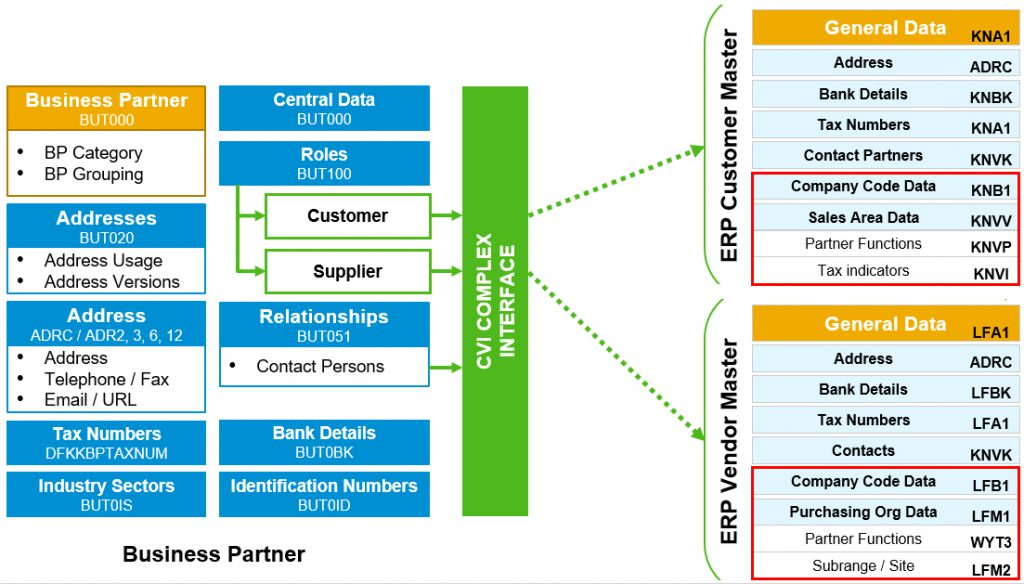
Source: https://blog.masterdataaficionado.com/mda-magazine-aug-2020/
How is Business Partner different from ECC’s approach?
- Unified Object (BP vs. Separate Objects in ECC):
BUT000- In ECC, customers and vendors had separate master data tables
- Customer data: KNA1, KNVV, etc.
- Vendor data: LFA1, LFB1, etc.
- In S/4HANA, both customer and vendor roles are managed under the Business Partner (BP) framework. This means that one BP can act as both a customer and a vendor, reducing data duplication and ensuring consistency.
- In ECC, customers and vendors had separate master data tables
- Roles in BP (table
BUT100)- A BP can have different roles for different functions:
- BP Role FLVN00 → Supplier
- BP Role FLCU00 → Customer
- This allows for centralized maintenance while still managing distinct attributes for customers and vendors.
- A BP can have different roles for different functions:
ECC tables vs. S/4 tables
| Source Table | Description | Target Table | Description |
|---|---|---|---|
| KNA1 | General Data in Customer Master | BUT000 | BP: General Data I |
| n/a | BUT100 | BP: Roles | |
| n/a | BUT020 | BP: Addresses | |
| ADRC | Addresses (Business Address Services) | ADRC | Addresses (Business Address Services) |
| KNW | Customer Master Sales Data | KNW | Customer Master Sales Data |
| KNB1 | Customer Master (Company Code) | KNB1 | Customer Master (Company Code) |
| KNA1 | General Data in Customer Master – Tax Information | DFKKBPTAXNUM | Tax Numbers for Business Partner |
| MARA | General Material Data | MARA | General Material Data |
| KNBK | Bank details | BUT000 | BP: General Data I |
| KNVK | Customer Master Contact Partner | BUT051 | BP Relationship Contact Person Relationship |
Source: https://www.ososoft.de/blog/business-partner-im-s4hana
Mapping Tables
- CVI_CUST_LINK - mapping table between PARTNER_GUID and CUSTOMER (KUNNR)
- CVI_VEND_LINK - mapping table between PARTNER_GUID and VENDOR (LIFNR)
Examples of tables using PARTNER_GUID instead or KUNNR or LIFNR columns
- AUSP: Characteristic Values (PARTNER_GUID column)
- USR21: User Name/Address Key Assignment (ORGANIZATION and BPPERSON columns)
- …